Showing posts with label Windows tool. Show all posts
Showing posts with label Windows tool. Show all posts
How to Start Task Manager in Microsoft Windows 7
By
//
No comments:

Microsoft Windows Task Manager is an application that provides access to change status of running program in windows. You can Check Running Applications, Running Processes, Running Services, Performance, Networking and also check / edit Online users on that Window.
- You can end all of the running apps by just single click, or can do individually depends upon your needs.
- You can check / Start / Stop the services running in the current windows Session.
- Can have look on performance of your Computer/ Laptop's CUP / Ram usage.
- You'll also find the Networking tab over there, which may help you to know about your Connection
- At the end Users Tab allow you to check which User / Account has been logged in or Locked, If you've enough rights of administrator then you can change the status of that user, either from Log In to Log Off or Log Off to Log In.
- Right Click on the Task Bar and Click " Start Task Manager ".
- Press CTRL + ALT + DELETE and click on Task manager when u'll redirected to a new Page.
How to Capture Screen in Windows?
By
//
No comments:
Screen Capturing
Screen Capturing is the tool to capture your Computer's Screen to save it for further uses. When you'll use this tool, it will capture All of the contents in your Computer's Screen, either you are using Paint, playing Game, using Internet, chatting with someone or watching live Match it will help you to save the current progress in the form of Image. Further you can use, edit and upload that image.

Uses of Screen Capturing
You can find this tool helpful in the following places
- During writing any article you must have to give some references, this tool will be very helpful there
- While watching Live TV you can save important updates with single button
- Anytime you can save your Computer's current Position which maybe usable in future
How to Capture Screen in Windows
There are two tools for Capturing Screen in windows which are officially provided by Microsoft.
- PrntScr tool for Capturing Screen in Windows
- Snipping Tool for Capturing Screen in Windows
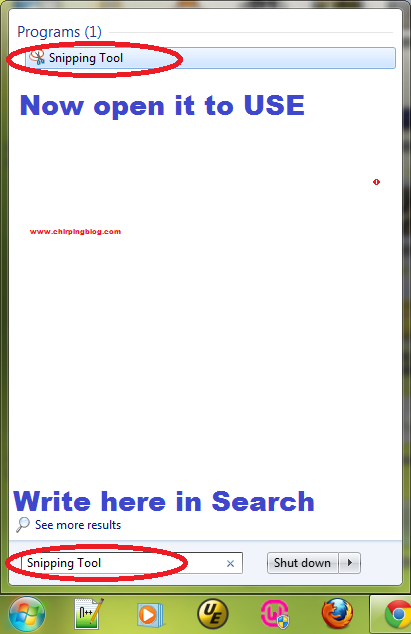
To use Snipping Tool follow the Following Procedure
- Click on "Start"
- Write "Snipping Tool" in search
- Open it to Use
If you found my Article informative and want others to let it know then Please share it to different Places by clicking below.
Don't forget to subscribe me, Click below in Footer.